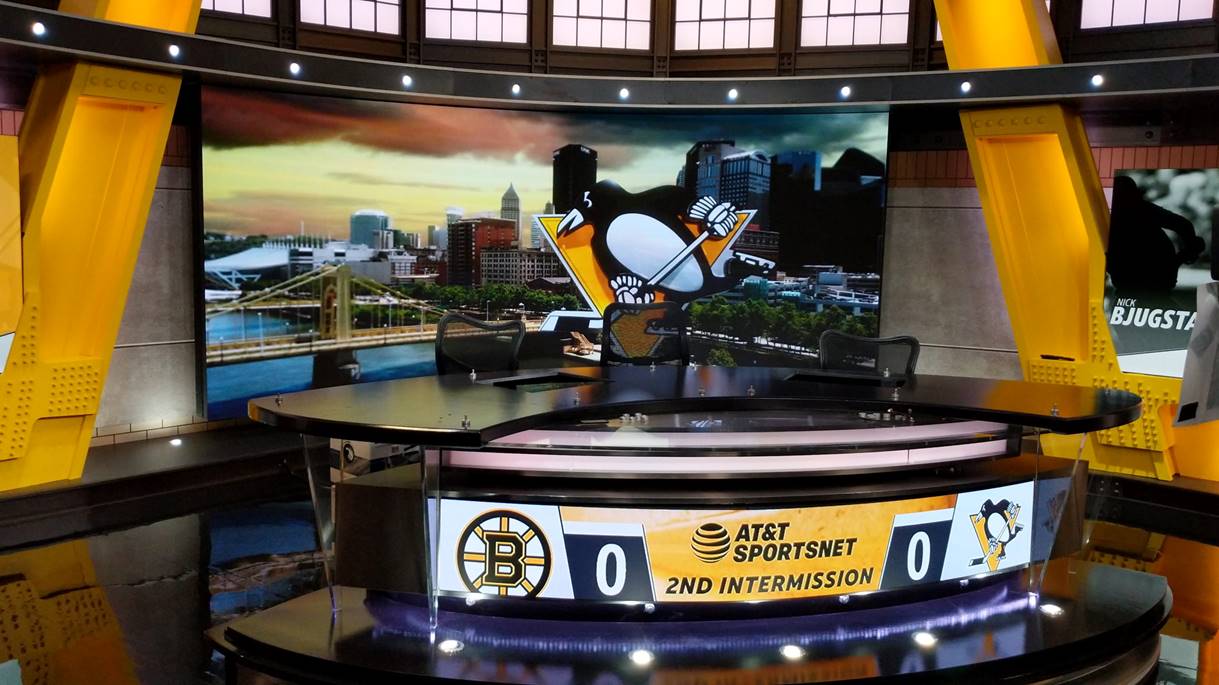
A flexible LED display for a broadcast studio is a bendable LED screen that forms curved backdrops, columns and wraparound walls behind presenters and guests. Durway’s IFlexPro flexible LED screen bends to fit curved studio geometry, with a pixel pitch range of 0.93–3.125 mm, a refresh rate of 1,920–3,840 Hz, frame rates of 59.94, 60 and 120 Hz, 16-bit grayscale, and an adjustable colour temperature of 2600–9500 K. For a backdrop that works on camera, the deciding factors are refresh rate, frame rate, moiré control and colour matching — not brightness alone.
Why Do Broadcast Studios Need a Flexible LED Backdrop?
A broadcast studio is a room designed to be photographed. Every surface in frame is part of the picture the audience sees at home. For decades, that background was a painted cyclorama, a printed backdrop or a flat video wall. A painted wall cannot change colour between segments. A printed backdrop cannot show moving graphics. A flat video wall reads as a rectangle and limits how a set designer can shape the space.
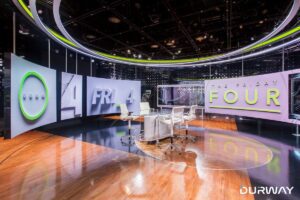
A flexible LED display changes the geometry of the set. Because the modules bend, the screen can curve around the presenter, wrap a corner, form a concave sweep behind a news desk, or build a cylindrical column a camera can orbit. The IFlexPro is Durway’s flexible LED screen for exactly this use. Its modules are ultra-thin and lightweight — 0.4 to 1.25 kg depending on module size — and mount magnetically, so curved walls and columns become practical to build. It is designed for broadcast studios, exhibitions, shopping malls, rental and stage work, and architectural decoration, and the studio is the most demanding of these settings.
What Makes an LED Screen Work on Camera?
A screen that looks fine in the studio can look terrible on the broadcast output. A camera samples the world in frames at a fixed rate, while an LED screen also produces its image in cycles, refreshing many times per second. When the two cycles do not line up, the camera picks up flicker, banding or a shimmering moiré pattern.
Four specifications decide whether a backdrop survives the camera. Refresh rate is how many times per second the screen redraws its image. The IFlexPro refreshes at 1,920–3,840 Hz, far faster than any camera frame rate, so the camera almost always catches the screen fully lit rather than mid-refresh.
Frame rate is how many new images per second the screen can display. The IFlexPro supports 59.94, 60 and 120 Hz. The 59.94 and 60 Hz rates match standard North American broadcast frame rates, while 120 Hz gives headroom for slow-motion replay and high-frame-rate production.
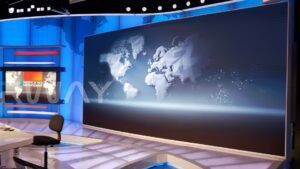
Grayscale depth decides how smoothly the screen renders subtle shades. A weather map gradient, a dusk skyline, or a muted background behind a presenter all depend on fine steps between dark and light. The IFlexPro uses 16-bit grayscale — 65,536 levels per colour channel — which prevents banding, the visible steps that appear when a gradient has too few levels.
Colour temperature is the warmth or coolness of the light the screen produces, measured in kelvin. The IFlexPro’s colour temperature adjusts from 2600 K to 9500 K. That matters because a studio mixes light sources: the key lights on the presenter, the practical lights in the set, and the screen must all agree, or the camera shows the presenter in one colour and the backdrop in another. The colour gamut is greater than 99% DCI-P3, the wide colour standard used in professional video.
What Is Moiré, and How Do You Avoid It on Camera?
Moiré is the shimmering, rippling pattern that appears when a camera photographs a regular grid — such as the rows and columns of LEDs in a screen — and that grid clashes with the camera sensor’s own grid. It is one of the most common reasons a studio backdrop fails on air.
Pixel pitch — the distance between the centres of neighbouring pixels — is the most important number for moiré control. The IFlexPro covers 0.93–3.125 mm, so a studio can choose a fine pitch for a backdrop close behind the presenter, shot in close-up, or a coarser pitch for a large wall the camera only sees from several metres away. The rule is simple: the closer the camera and the tighter the shot, the finer the pitch. A backdrop filling the frame behind a presenter two metres in front of it needs the fine end of the range, so the LEDs are too small for the sensor to resolve as a grid. A curved backdrop helps too: the curve changes the angle at which the screen meets the camera, so the pattern does not build up uniformly the way it can on a flat wall.
How Do Curved Backdrops Change Studio Design?
A flat video wall gives a studio one background: a rectangle. A curved flexible LED backdrop gives a studio a space, and the difference shows in three ways.
First, it gives the camera more angles. With a flat wall, the camera can only shoot from the front; move to the side and the wall foreshortens into a thin strip. With a concave curve wrapping behind the presenter, the camera can move across a wide arc and still see a full background.
Second, a curve creates depth. A flat wall reads as a picture on a wall. A curved wall that sweeps around the presenter reads as an environment the presenter is standing inside, so the set feels like a real place.
Third, a flexible screen allows shapes a flat wall cannot make. The IFlexPro’s modules come in three sizes — 400 × 300 mm, 288 × 144 mm and 300 × 168.75 mm — and bend to form curves, columns, waves and wraparound walls. A concave sweep can hold a whole panel discussion inside one continuous backdrop. The modules splice seamlessly, with no visible joints across the curve, and magnetic mounting makes these shapes practical to build and rebuild between productions. The 160-degree viewing angle keeps the whole sweep bright and colour-accurate from every camera position around the studio.
How Do You Choose the Right IFlexPro Configuration for a Studio?
The IFlexPro is one product family with a range of configurations. The right choice depends on the studio’s cameras, distances and set design.
| Feature | IFlexPro specification |
|---|---|
| Pixel pitch | 0.93–3.125 mm |
| Module sizes | 400 × 300 mm; 288 × 144 mm; 300 × 168.75 mm |
| Module weight | 0.4–1.25 kg |
| Brightness | 800–1200 nits |
| Refresh rate | 1,920–3,840 Hz |
| Frame rate | 59.94 / 60 / 120 Hz |
| Grayscale | 16-bit (65,536 levels) |
| Contrast | 5000:1 |
| Viewing angle | 160° |
| Colour temperature | 2600–9500 K, adjustable |
| Colour gamut | >99% DCI-P3 |
| Protection rating | IP30 (indoor) |
| LED lifetime | 100,000 hours |
| Mounting | Magnetic |
| Maintenance | Front and rear |
| Splicing | Seamless |
| Control system | NovaStar default; other brands per customer request |
| Certifications | ETL, TUV-CE, FCC, CB, EAC, RoHS |
| Warranty | Typically 2–3 years, extendable |
| Expected durability | 5–8 years |
Choose the pixel pitch by camera distance. Measure the closest distance from which a camera will shoot the backdrop in a tight shot, and choose a pitch fine enough that the LEDs disappear at that distance.
Choose the module size by the curve. Smaller modules follow a tighter curve; larger modules cover a broad sweep more efficiently. Module weights — 0.4 kg for the smallest to 1.25 kg for the largest — also matter for the support structure.
Check the brightness against the studio lighting. At 800–1200 nits, the IFlexPro reads clearly under studio lighting, but it is not a daylight outdoor screen. Test it under the studio’s actual lighting with the cameras rolling. The screen is indoor-rated at IP30.
Confirm the control system and the content workflow. NovaStar is the default controller for the IFlexPro, and other brands can be fitted per customer requirements; no specific controller model is promised in advance. What matters is that the controller fits the production workflow. Magnetic mounting and front and rear maintenance mean modules can be serviced or swapped without dismantling the curved wall.
Plan for the life of the set. The LED lifetime is 100,000 hours, the expected durability is 5–8 years, and the typical warranty is 2–3 years, extendable on request.
What Should the Studio Checklist Cover Before Going Live?
A broadcast backdrop has to be right on the first day it goes on air. This checklist covers the points that cause the most problems when left until the last minute.
- Test with the real cameras. Use the studio’s actual cameras at the settings used on air, at every distance and angle the show will use. Check for flicker, banding and moiré on the broadcast monitor.
- Match the frame rate end to end. Confirm the screen, the camera and the broadcast chain all agree — 59.94, 60 or 120 Hz. A mismatch anywhere can reintroduce flicker.
- Tune the colour temperature to the studio lighting. Set the screen between 2600 and 9500 K to match the key lights on the presenter, then check skin tones on camera.
- Check the curve from every camera position. Shoot from each camera’s position and look for brightness fall-off, colour shift or seams.
- Confirm power, data and mounting. Verify the power supply and control signal routing, and confirm the support structure can carry the modules at their installed weight.
- Prepare the content in the right format. Design the first backdrop loops for the curved wall, and test them on the wall before the first broadcast.
- Keep the certifications on file. The IFlexPro carries ETL, TUV-CE, FCC, CB, EAC and RoHS certifications.
- Plan maintenance access. Confirm technicians can reach the modules for front and rear maintenance.
Frequently Asked Questions
What pixel pitch should a broadcast studio backdrop use?
It depends on the closest camera distance. The IFlexPro covers 0.93–3.125 mm. A backdrop shot in close-up behind a presenter needs a fine pitch from the lower end of the range.
Why does refresh rate matter for a studio screen?
If the screen refreshes slowly, the camera can catch it mid-refresh and the audience sees flicker or rolling bands. The IFlexPro refreshes at 1,920–3,840 Hz, far faster than the camera’s frame rate, so the backdrop looks stable on air.
What frame rates does the IFlexPro support?
59.94, 60 and 120 Hz. The 59.94 and 60 Hz rates match standard North American broadcast frame rates.
Can the screen’s colour be matched to the studio lighting?
Yes. The colour temperature is adjustable from 2600 to 9500 K, so the screen can be tuned to match the key lights on the presenter. The colour gamut is greater than 99% DCI-P3.
Can a flexible LED screen form a curved wall or a column?
Yes. The IFlexPro’s modules bend to form curves, columns, waves and wraparound walls, and they splice seamlessly, so there are no visible joints across the curve.
How bright is the IFlexPro, and is it suitable for a studio?
Brightness is 800–1200 nits, designed for indoor use under studio lighting. The screen is indoor-rated at IP30.
What control system does the IFlexPro use?
NovaStar is the default controller, and other brands can be fitted per customer requirements. No specific controller model is promised in advance; the choice is confirmed with the project team during planning.
How long will a studio IFlexPro installation last?
The LED lifetime is 100,000 hours, the expected durability is 5–8 years, and the typical warranty is 2–3 years, extendable on request.
A Backdrop That Disappears — and Lets the Show Appear
A good broadcast backdrop does something paradoxical: it disappears. It still carries the graphics, colour and mood of the programme — but it disappears as a problem. Nobody at home notices flicker, or moiré, or a backdrop that fights with the presenter’s skin tone. They notice the show.
Choose the pixel pitch by the closest camera, confirm the refresh and frame rates against the broadcast chain, and tune the colour temperature to the studio lights.
We turn clients’ concepts into reality. For specifications, quotations and project advice, contact Durway at info@durway.com.